Start with your own words.
You want to speak your setup, levels and reasoning, check the draft, and keep your original recording for review.
Review your draft before savingJerno turns a spoken account of your trade into a draft you check. TradeZella brings journaling together with importing, replay and backtesting. Here’s how the workflows compare.
Compare the detailsYou want to speak your setup, levels and reasoning, check the draft, and keep your original recording for review.
Review your draft before savingYou want broker-connected journaling alongside historical replay, backtesting and AI analysis.
Explore TradeZella (opens in a new tab)Read what each feature does. Check the source and the plan before choosing.
“Not verified” means we could not confirm a capability in the sources reviewed. It does not mean the feature is absent.
| What matters to you | Jerno Current beta | TradeZella |
|---|---|---|
| Voice notes & original audio | Record a note and keep the original audio with your entry. Explore in Jerno | Voice memos are advertised. Source 1 |
| Speech into trade fields | Draft trade details from speech, then edit and confirm before saving. Explore in Jerno | Not verified Not verified in the public documentation reviewed. Source 1 |
| Chart evidence | Photograph or upload charts and annotate what mattered. Explore in Jerno | Chart attachments and integrated charting. Source 2 |
| Trade context & history | Keep entry reasoning, management notes and the outcome in a timeline. Explore in Jerno | Trade-linked notes, tags and execution details. Source 2 |
| What matters to you | Jerno Current beta | TradeZella |
|---|---|---|
| Playbooks & rules | Set up weighted checklists and review recorded rule adherence. Explore in Jerno | Strategies, rules and checklists. Source 2 |
| Performance reports | Review recorded P&L, risk, drawdown and setup or mindset breakdowns. Explore in Jerno | Custom dashboards, filtered reports and excursion analysis. Source 2 |
| Session review | Revisit the day’s trades and play original notes in chronological order. Explore in Jerno | Daily checklists and session recaps. Source 2 |
| Sharing | Create branded trade or daily-summary images to share. Explore in Jerno | Trade and journal sharing. Source 2 |
| What matters to you | Jerno Current beta | TradeZella |
|---|---|---|
| File imports | Reviewed compatible CSV imports: Tradovate, NinjaTrader, TradeStation and TopstepX. Explore in Jerno | File upload; method depends on the broker. Source 2 |
| Automatic broker events | Controlled MT5 desktop bridge pilot. Approved testers only; read-only. Explore in Jerno | Automatic sync for supported connections. Source 2 |
| Phone & desktop | Responsive web app, installable on your device. No native store app. Explore in Jerno | Web access; verify device-specific features before choosing. Source 2 |
| What matters to you | Jerno Current beta | TradeZella |
|---|---|---|
| AI assistance | Transcription and structured capture. No conversational AI coach. Explore in Jerno | Zella AI analysis and questions about trading data. Source 1 |
| Market replay & backtesting | Not offered. Recorded-note playback is separate from market replay. Explore in Jerno | Backtesting tools; trade replay is offered on Pro and Ultra. Source 3 |
| Price & availability | Free invitation-only beta. No card required; access is not immediate. Explore in Jerno | See current plans, billing terms and feature limits. Source 3 |
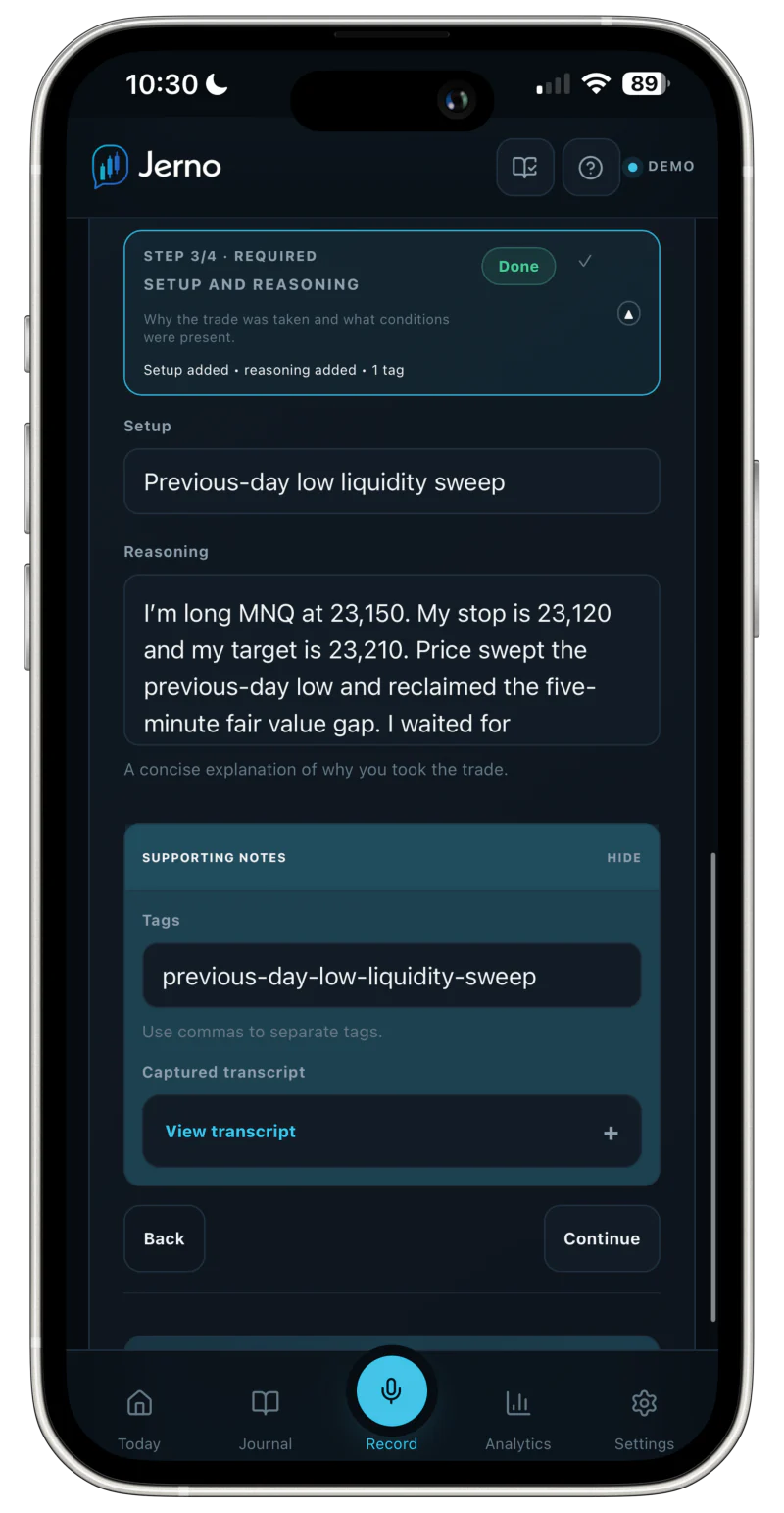
Your words become a draft. You stay in control of the record.
Record your setup, key levels and what you were thinking. You can type instead.
Review the proposed fields. Correct anything missing or misunderstood before you save.
Revisit the original audio, your chart evidence and the decisions that followed.
Its website advertises voice memos. A saved memo and speech that populates editable trade fields are different capabilities. We did not verify the latter in the public TradeZella documentation reviewed; that is not proof it is unavailable.
A direct TradeZella migration is not currently supported. Jerno accepts specific compatible broker exports; a generic CSV export is not a guarantee of compatibility. Contact us before relying on a migration.
No. Start with a voice or typed entry. Compatible file imports are available for the listed platforms, and the MT5 desktop bridge is a controlled pilot for approved testers.
You can explore the browser-local demo with sample entries now. Cloud access is invitation-only: join the beta list and confirm your email; we will contact you when your place is ready. Beta access is free and no card is required.
Prepared by Jerno from the official pages linked here and Jerno’s current product. This is a documentation-based comparison, not an independent hands-on test or a ranking.
Checked 16 September 2026. Capabilities, pricing and availability can change. Some tools require a particular plan, device or broker. A listed import does not establish automatic sync, and upcoming features are not treated as available.
Suggest a correctionTRY THE WAY JERNO WORKS
Explore the demo with sample entries, or join the invitation-only beta list.
Free during beta · No card required · Access by invitation